Decisions
Vom makes decisions for customers in one of two ways:
- API integration: for each decision, the customer system will call the Vom API, supply parameters, and gets a decision back.
- Batch decision: many decisions will be made at once based on an input file.
API Integration
Vom provides a simple REST API for customers to integrate with. It's hosted at https://api.vomdecision.com and documented at in general at https://api.vomdecision.com/docs and for a specific policy at https://api.vomdecision.com/v1/organizations/{organization_name}/decide/{policy_name}/docs.
A client API for the programming language the customer uses can be generated using the OpenAPI JSON file available at https://api.vomdecision.com/v1/organizations/{organization_name}/decide/{policy_name}/docs for the Decision API or https://api.vomdecision.com/openapi.json for other APIs.
The endpoint customers should normally use is
/v1/organizations/{organization_name}/decide/{policy_name},
with these parameters:
-
organization_namein the URL path: Name of the customer within Vom. The Vom team will provide a value for this during customer onboarding. -
policy_namein the URL path: Name given to the decision policy when it was created in http://studio.vomdecision.com. -
Header
x-api-key: Authorizes your app to decide the policy. The Vom team will provide a value for this during customer onboarding. -
Request body: should be a JSON with the parameters to feed into the Decision API, that is, key-values as expected by the policy input configuration. For example, for this policy:
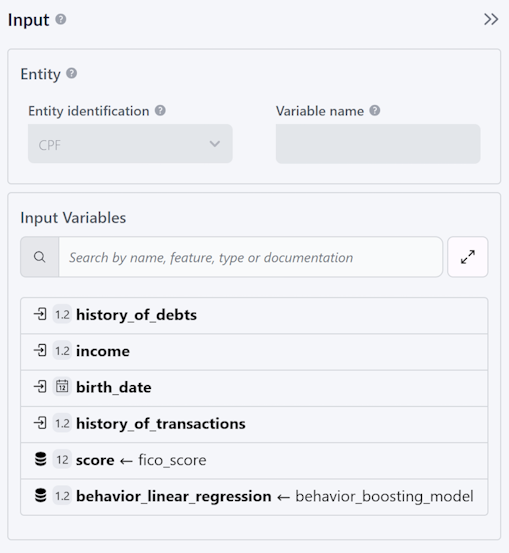
It could be:
{"cpf": "78204769075","income": 4000.0,"birth_date": "1983-06-12T00:00:00Z","history_of_transactions": 15000.0}Notice the icon before the input variables marking which ones come from the API request and which ones are consumed from the Vom feature store.
The endpoint should return 200 on success and an HTTP error status code otherwise.
Here are relevant the fields of the returned JSON body:
-
id: Unique id assigned by Vom for this decision. It should be saved by the customer in their data warehouse to enable later joins of Vom and customer data. Notice in batch decision output and decision history export files, it shows up asexecution_id. -
version_name: String with the version of the policy that was used to make the decision. The customer might want to save this value to their data warehouse to analyze the performance of different versions. -
decision: JSON with decision output variables, as configured in the version. The policy author should instruct the integrating team on what values to look for within the JSON. It will be null if an error code was returned. -
error: If an error code was returned, details of the error, or null if there was no error. It's aProblemDetailsobject as per RFC-7807. For example, it will look like this if a value for required variablecpfis not passed:{"status": 422,"type": "http://api.vomdecision.com/error/missing-param","title": "Missing param","detail": "input variables [cpf]"}
There are a few kinds of errors the API can return, and each should be handled differently by the client:
- Client errors use status codes 400 and are caused by the client sending an invalid request, such as not providing a required parameter. Since they can only be fixed by changing the request the client should not retry them. Instead developers should be alerted to fix the issue.
- Config errors use status code 412 and are caused by a customer misconfiguration, like a formula that divides a number by zero. Since the errors can only be fixed by fixing the faulty config, the client should not retry the decision, but it should generate alerts so that the customer can fix issues.
- Connector errors use status code 502 and mean a connector used in the decision cannot answer the request. This might happen because the provider does not have data for the end user, the connector is misconfigured, or there's a provider temporary instability. The client should not retry the decision, as Vom already does it when it makes sense. Nevertheless it makes sense for these errors to trigger client alerts. Notice connector errors can be monitored in https://studio.vomdecision.com/org/metrics.
- Vom errors use status code 500 and are caused by platform instabilities. Since they are transient, their requests should be retried preferably with exponential backoff.
Any other error codes should be rare and transient, so they be handled the same as Vom errors (500).
In all error cases the response body should contain valuable data for debugging, so it should be logged by the API client.
Here is a complete example of calling the Decision API using CURL:
curl -X 'POST' \
  'https://api.vomdecision.com/v1/organizations/myorg/decide/mypolicy' \
  -H 'accept: application/json' \
  -H 'x-api-key: my_api_key' \
  -H 'Content-Type: application/json' \
  -d '{
        "cpf": "78204769075",
        "income": 4000.0,
        "birth_date": "1983-06-12T00:00:00Z",
        "history_of_transactions": 15000.0
      }'
Batch Decision
Batch Decisions allows you to decide a Policy for a large dataset at once, running multiple decisions in parallel. This is achieved by uploading a CSV file with one row of input data for each decision. After the decisions are complete, you can download a file with the results and another with any errors. The process can be done through the web interface or the REST API.
The input file must be a CSV file where each row after the header represents the data for a single decision, and each column represents a variable that will be input to the Policy. The first row (header) must contain the names of the variables used in the Policy. Note that an empty field means the variable won't have a value for that decision, except for text variables, where "" is a valid value. When a variable is missing a value, the default will be used, or that individual decision will get an error if no default was configured.
After the batch decision is complete, a CSV file with the results will be available for download, and you will also receive an email notification.
CSV File Format
Follow this specification to create a CSV file for batch decision:
- Use comma (,) as the delimiter to separate fields
- Enclose fields containing special characters (such as the delimiter) in double quotes (")
- Use repeated double quotes ("") to include the " character in a field
- Don't include spaces before or after the delimiter unless explicitly intended (those spaces will be considered part of the field)
- Use dot (.) as the decimal separator for decimal fields
- For Datetime variables, use
combined date and time ISO 8601 string
in the UTC timezone (i.e., ending with Z), for example
2024-01-20T14:01:15Z. If representing dates without time, use zero for the time part (for example2024-01-20T00:00:00Z) - Use true or false for boolean fields
- Enclose lists in double quotes, for example
"[1, 2, 3]"
For example, if you have a Policy that uses five variables: age (integer),
income (decimal), address (text), has_requested_loan (boolean), and
last_loan (datetime), and you want to run it for three different individuals,
the input file would look like this:
age,income,address,has_requested_loan,last_loan
25,5000.50,"123 Main Street, Apt ""4 B""",true,2023-12-20T12:00:00Z
37,7500,"456 Oak Avenue, Suite 300",false,
42,10000.75,789 Pine Road,true,2024-04-01T21:59:59Z
CSV Output File
Vom creates CSV files as the output of Batch Decisions or when exporting decision history. Both share the same format as the batch decision input with these additional columns:
version_name: The name of the version that was run for the decision, for example "v1".result: The result of the policy as configured in the Output and chosen in End blocks. For example "Approved". This column will be missing if there are no results configured in the version and will have the value "" if the particular decision failed.positive_outcome: "True" or "False" depending on whether the result was considered positive or negative in the version Output configuration. If no result was configured, the result is configured as neutral, or there was an error, it will be "".error: An error message if there was an error deciding that row. For example, if non-numeric text was provided for an integer variable.execution_id: A unique identifier for this decision, which is the same one returned in fieldidon the Decision API call. This column is only added when exporting decisions from history.time: The instant the decision ran as a combined date and time ISO 8601 string in the UTC timezone. For example2024-01-20T14:01:15Z. This column is only added when exporting decisions from history.- If a backtest reading from the Decision History was run, extra columns about
the original decisions will be added with the same meaning as the columns
above. These columns allow comparing backtest results to original results:
original.version_name: Version used for the original decision.original.time: The time the original decision ran as a combined date and time ISO 8601 string in the UTC timezone. For example2024-01-20T14:01:15Z.original.result: Will be "" if the original run had no configured result or ended in an error.original.positive_outcome: Will be "" if the original run had no configured result or ended in an error.original.error: The error message if the original decision failed, or "" if it didn't fail.original.execution_id: The id for the original decision. That is the same id returned on the id field of the original call to the Decision API.
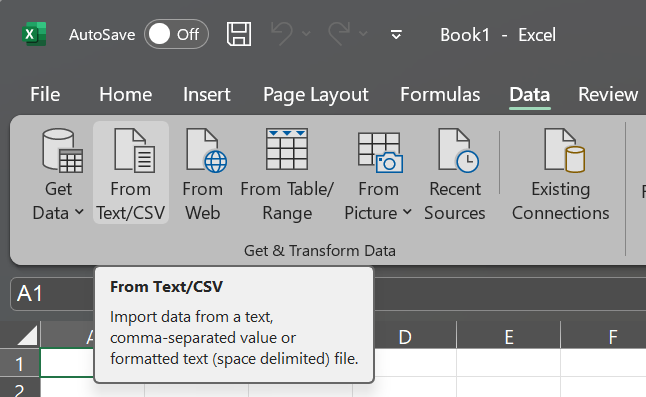
If you have problems with line breaks creating new rows in Excel, import the CSV file using Excel's "Get Data" feature: